

If you’ve ever felt overwhelmed by Photoshop or Lightroom but still want pro-level image results, then Skylum’s Luminar Neo might be exactly what you’re looking for. Many photographers struggle with steep learning curves or tedious manual editing—and Luminar Neo streamlines that by putting powerful AI tools right at your fingertips. Whether you’re an amateur looking to clean up your travel shots or a serious hobbyist wanting creative control without the clutter, this software simplifies the hard stuff so you can focus on your vision.
TLDR, What Makes Luminar Neo Stand Out
-
AI-Powered Tools
advanced AI features handle complex edits like sky replacement, relighting, and object removal, saving you time and effort -
User‑Friendly Interface
the layout is intuitive enough for beginners but deep enough for pros who want precise control -
Support for Multiple Workflows
works on its own or as a plugin with Lightroom, Photoshop, or Apple Photos for flexible editing options Skylum+1 -
Non‑Destructive Editing
your original image stays safe while you experiment freely with layers and edits Skylum+1 -
Cross‑Platform Use
available for both Mac and Windows which makes it accessible regardless of your setup Skylum+1
View all on Skylum
Powerful AI Tools That Do the Heavy Lifting

One of the most compelling reasons to choose Luminar Neo by Skylum is its suite of AI‑driven editing tools. With Sky AI, you can instantly replace dull or overexposed skies with dramatic clouds or sunsets. Relight AI builds a 3D depth map of your scene, letting you adjust lighting based on spatial information—no manual masking required. Skylum+1
For portraits, Portrait Bokeh AI gives professional-looking background blur, and Skin AI smooths blemishes in a natural way. These tools feel smart and intuitive and let you achieve striking results faster than traditional methods.
An Interface That Balances Simplicity and Power
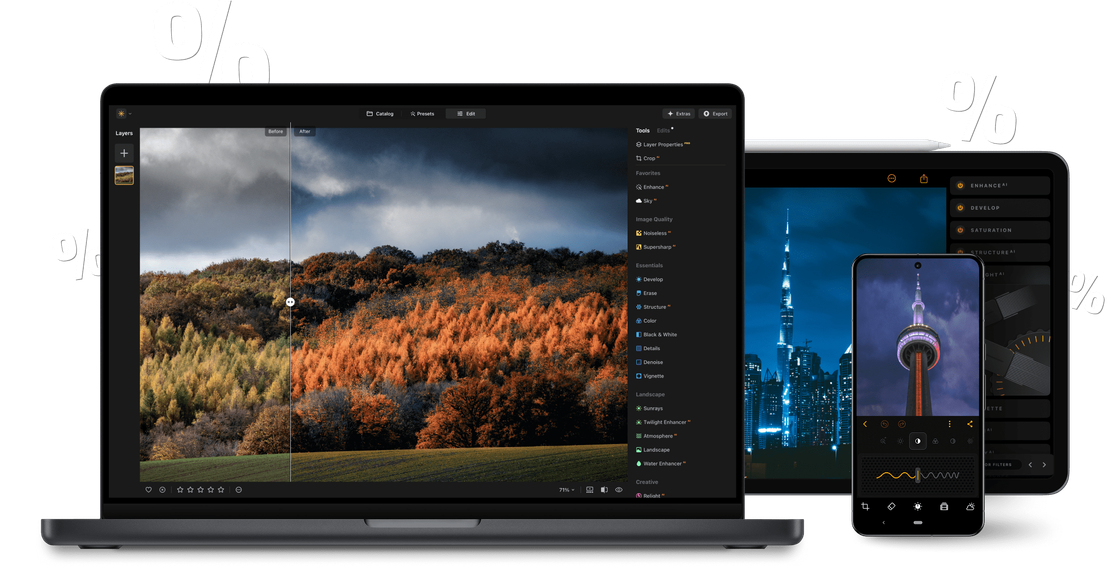
Unlike other complex editors, Luminar Neo is designed to be approachable. Its clean, organised interface makes it easy for first-time users to start editing right away. But beneath that simplicity, there is real depth. You can work with layers, masking, and even blend multiple effects—all without losing clarity or getting lost in menus. Skylum+1
If you’re used to Lightroom or Photoshop, the option to use Luminar Neo as a plugin means you don’t have to abandon your existing workflow. That flexibility is a win for people who want more creative tools without learning a whole new system.
Editing Without Fear: Safe, Non‑Destructive Workflow

Using Luminar Neo, you never overwrite your original image. Every change is non‑destructive, so you can test dramatic edits and then dial them back if needed. This encourages experimentation. Skylum
Batch processing is also supported, which is great if you’ve got a shoot with dozens of similar photos. You can apply AI-based enhancements, clean up noise, or upscale images in groups, saving a huge amount of time. Skylum
Cross‑Platform Versatility That Fits Your Setup
Whether you’re on a Mac or a Windows PC, Luminar Neo has you covered. The software runs well on both platforms and even supports being used as a plugin inside apps like Adobe Photoshop, Lightroom, or Apple Photos. Skylum
That means you don’t have to force a change in your toolset—you can gradually introduce Luminar’s AI tools into your editing workflow. For many people, that’s a more practical way to try something new without losing their current system.
Where Skylum Could Improve: Feedback From Users
While many users love Skylum’s AI, some have raised valid concerns. On Reddit, a few have reported stability issues:
-
Some say the software crashes or causes high system load on weaker machines. Reddit
-
Others mention licensing confusion, especially around “lifetime” licenses, and feature support may be limited. Reddit+1
-
There are also tales of slow or generic customer support, which can be a hassle when you hit technical snags. Reddit
That said, many of these issues are tied to system specs or how licenses were purchased, not necessarily the core editing engine itself.
Final Thoughts: Is Luminar Neo Worth It?
If you are someone who wants powerful editing tools without the usual complexity, Skylum’s Luminar Neo is a strong contender. It offers AI‑driven features that handle difficult tasks, a clean but capable interface, safe non‑destructive editing, and flexibility across platforms. While there are some reported quirks around licensing and performance, the core experience remains compelling for both hobbyists and creators who care about creative freedom.